
Smart Shift Planning
Create perfect schedules in minutes, not hours.
Discover intelligent shift planning that adapts to your team’s needs. With our easy drag-and-drop feature, customize schedules effortlessly while enjoying powerful automation. Optimize your workforce for enhanced productivity and employee satisfaction. Wave goodbye to scheduling headaches and embrace a more efficient shift management approach!
Planovo is easy to use and combines all the tools for successful shift planning.


Trusted by clients worldwide
Flexible
Plan Shifts built for the way modern teams work
Whether your team is at their desks or on the go, Plan Shifts Schedule offers adaptable tracking methods that fit your workforce’s needs and the locations they work from.
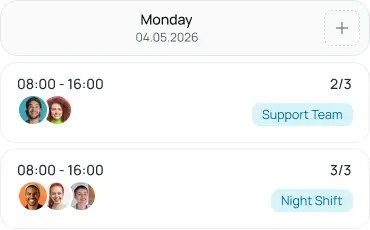
Fixed or Flexible work schedules
Fixed or flexible work schedules designed to fit both operational needs and employees.
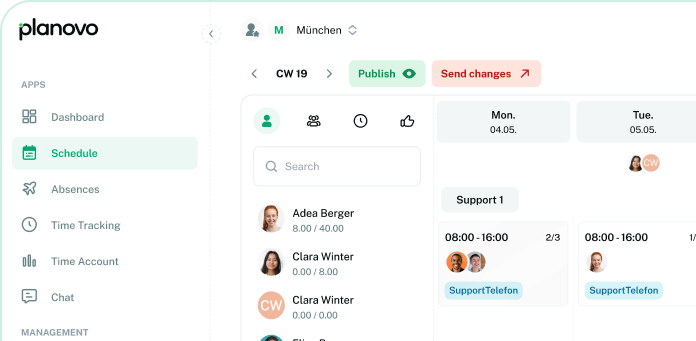
Multiple locations? No problem!
Scalable from individual businesses to chain restaurants. A platform for full control over teams, planning, and processes.
Enterprise-Grade Security
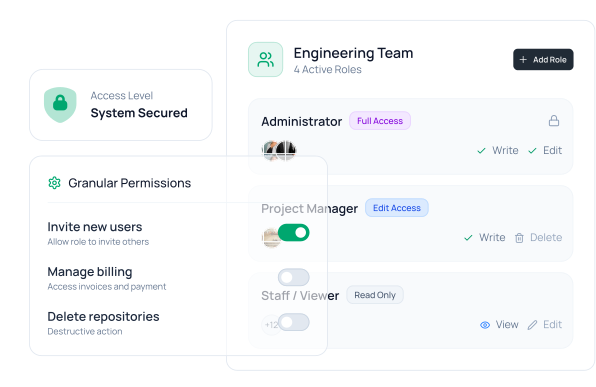
Manage Access by Role
Control exactly what each employee or team role can view, edit, or manage within your platform. Create fully customizable permissions with complete flexibility and secure access control.

Trusted by modern teams
The Transformation
From Chaos to Clarity
Powerful tools grouped around your daily goals to run your team smoothly.
The Problem
Managing schedule shouldn't be chaotic
Teams struggle with outdated scheduling methods: endless email chains, spreadsheet chaos, and constant confusion about who’s working when.
- Time wasted coordinating shifts manually
- Vacation requests lost in email threads
- No clear overview of working hours
- Team members constantly asking about schedules
The Solution With Planovo
Managing schedule shouldn't be chaotic
Teams struggle with outdated scheduling methods: endless email chains, spreadsheet chaos, and constant confusion about who’s working when.
- Time wasted coordinating shifts manually
- Vacation requests lost in email threads
- No clear overview of working hours
- Team members constantly asking about schedules
Flexible
Plan Shifts built for the way modern teams work
Whether your team is at their desks or on the go, Plan Shifts Schedule offers adaptable tracking methods that fit your workforce’s needs and the locations they work from.
Visual schedule builder
Intuitive drag-and-drop interface makes scheduling feel effortless. See your entire team’s week at a glance.
- Color-coded shifts by role or department
- Availability indicators show who's free
- One-click schedule templates
- Mobile-responsive for on-the-go edits
Smart conflict resolution
Never worry about scheduling mistakes. Planovo catches conflicts instantly and suggests fixes.
- Real-time overlap detection
- Understaffing alerts
- Skill-based matching
- Fairness distribution tracking
Template & pattern system
Save hours by reusing proven schedules. Build once, deploy many times with smart variations.
- Save custom templates
- Auto-rotate shift patterns
- Seasonal schedule variations
- Multi-location sync
How It Works
Get started in minutes
Simple, streamlined workflow that fits naturally into your day
Set Up Your Team
Build Your Schedule
Publish & Notify
How It Works
Get started in minutes
Simple, streamlined workflow that fits naturally into your day
GDPR / DSGVO Compliant
Full data privacy compliance. We provide standard Data Processing Agreements (AVV).
100% Hosted in Germany
Data sovereignty guaranteed. All servers are located in ISO 27001 certified German data centers.
256-bit Encryption
All data transmission is secured with bank-level encryption, ensuring your information remains private and protected at all times.
MiLoG Ready
Legally sound documentation of working hours, breaks, and overtime to satisfy MiLoG requirements.
Ready to transform your scheduling?
Join hundreds of teams saving hours every week with Planovo. Start your free trial today—no credit card required.
- No Credit Card
- No Installation
- GDPR Compliant
Testimonials
See why our clients love us
We believe in getting the details right, keeping our promises, and
always going the extra mile. It’s how we work and why our clients trust us.
Planovo has been an exceptional partner. Their team’s expertise and dedication were clear throughout the process, delivering a platform that exceeded our expectations. The feedback from our employees has been outstanding.
Jen Rae
Planovo provides innovative solutions, technical skills, HR expertise, and excellent project management for effective employee management. We wholeheartedly endorse their team.
Liane Goldring
Working with Planovo has been an absolute pleasure. They are true experts in employee management, and we are thrilled with our new HR platform that prioritizes our team members’ needs. I look forward to continuing our partnership with Planovo as W5’s ally in digital HR development.
Ann Graham
Working with Planovo has been a delight for our HR management and employee engagement. Their team was responsive and attentive as we refined our vision for a better workplace experience.
Liane Goldring
Our collaboration with Planovo was exceptional; we felt confident with their skilled team. They truly understood our HR needs.
Liane Goldring
We partnered with Planovo to develop two new platforms: one to enhance our employee experience and another to strengthen our HR management capabilities.
Liane Goldring
FAQs
See why our clients love us
We believe in getting the details right, keeping our promises, and
always going the extra mile. It’s how we work and why our clients trust us.
Most teams are up and running within 15 minutes. Simply add your team members, set their availability, and start creating schedules. Our onboarding wizard guides you through each step.
Yes! Planovo has native mobile apps for iOS and Android. Employees can view schedules, request time off, swap shifts, and clock in/out directly from their phones.
Employees can request shift swaps directly in the app. The system notifies available team members, and once someone accepts, the manager receives a notification for approval. The schedule updates automatically once approved.